Application types
Every application type OSS Panel can create, which stack can host it, and exactly what each one's form asks for.
OSS Panel ships a catalog of 37 application types. Which ones you see depends on the stack the server was installed with — so this page starts with that, then covers each one-click application's form in turn.
What your server can host
Every type declares a serving profile: the way it has to be served. Each stack handles some profiles and not others, and the installer fixed that when the server was built.
| Stack | Web server | Serves | Application types offered |
|---|---|---|---|
lemp | nginx | php, static | The 10 PHP apps, Git deploy, blank PHP, static |
lamp | Apache | php, static | The same |
ols | OpenLiteSpeed | php, static | The same |
mern | nginx | node, static | The 4 Node apps, static |
docker | nginx | docker | The 20 container types only |
From Git repo and Blank PHP site are PHP-profile types, so they appear
on lemp, lamp and ols only — a mern server offers the packaged Node
apps and a static site, not Git deployment. Static site is the one type on
every stack except docker.
A type your stack cannot serve is not shown at all
It is left out of the grid rather than greyed out, because nothing you can install would unlock it — the stack is the decision, and changing it means reinstalling. A card that is shown but disabled is a different thing: it is missing a runtime or a database engine, and the card says which and links to the screen that installs it.
The full catalog
Served as PHP — need a lemp, lamp or ols server:
WordPress · Nextcloud · Joomla · Moodle · Mautic · Craft CMS · Akaunting · Statamic · PrestaShop · phpMyAdmin · From Git repo · Blank PHP site
Served as static files — on every stack except docker:
Static site
Served as Node processes — need a mern server:
Uptime Kuma · n8n · Node-RED · NodeBB
Served as containers — need a docker server:
Docker container · Ghost · Vaultwarden · Gitea · Forgejo · FreshRSS · Stirling PDF · IT-Tools · Glance · Homepage · NocoDB · Matomo · Mattermost · Chatwoot · Excalidraw · Metabase · Wiki.js · Grafana · BookStack · WordPress
Node code on a PHP server
The stack restricts application types, not languages. From Git repo is a PHP-profile type, and its Rendering type field offers server-side and client-side rendering — so a Node application can be deployed from Git on a LEMP server even though the packaged Node apps are not offered there. See Deploy from Git.
Requirements at a glance
For the PHP applications:
| Type | PHP | Database |
|---|---|---|
| WordPress | 7.4+ | MySQL or MariaDB |
| Nextcloud | 8.3 – 8.5 | MySQL, MariaDB or PostgreSQL |
| Joomla | 8.3+ | MySQL, MariaDB or PostgreSQL |
| Moodle | 8.2+ | MySQL, MariaDB or PostgreSQL |
| Mautic | 8.2 – 8.5 | MySQL or MariaDB |
| Craft CMS | 8.2+ | MySQL, MariaDB or PostgreSQL |
| Akaunting | 8.1+ | MySQL or MariaDB |
| Statamic | 8.3+ | None — flat file |
| PrestaShop | 7.2 – 8.5 | MySQL or MariaDB |
| phpMyAdmin | 7.2+ | None of its own |
A type is disabled in the grid when no installed PHP version falls in its range, or when none of the engines it accepts is installed. Both are fixable from the PHP and Databases screens without leaving the flow.
Fields every type shares
Before the per-type fields, three controls behave the same everywhere:
- PHP version — only versions this application supports, with its requirement printed underneath. Refresh picks up a version you installed a moment ago.
- Database engine — shown only when more than one accepted engine is installed. It cannot be changed after the application exists.
- Advanced settings — collapsed, and safe to leave alone. Web root lives here, along with per-type extras like a table prefix.
WordPress
Blog and website builder. The most common thing on the catalog, and the one
with Magic Login support — the panel can sign you into wp-admin without
a password.
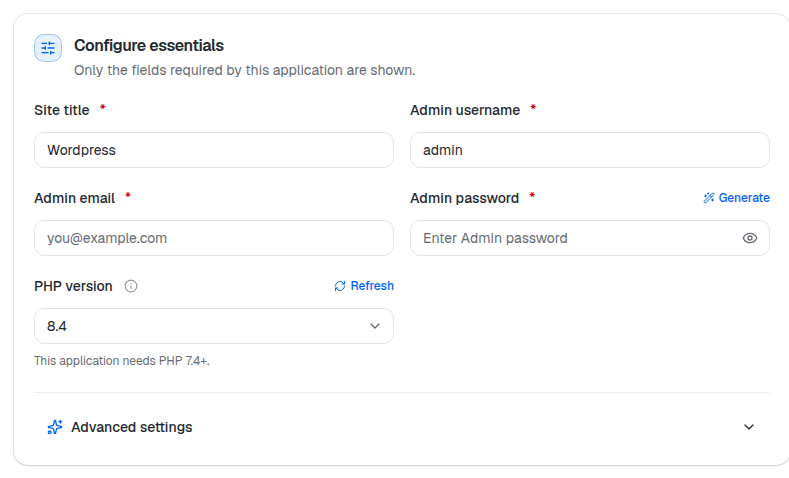
Advanced settings adds Site language, Time zone, Table prefix
(wp_ by default — change it if you want a non-obvious one) and Web root.

Nextcloud
Private file sync and share. The admin account you give here is the first Nextcloud user.

Nextcloud pins PHP to 8.3 – 8.5; a server with only PHP 8.1 installed will show the card disabled until you install one in range.
Joomla
Flexible content management system.

Administrator name is the display name; Admin username is what signs in. A table prefix lives under Advanced settings.
Moodle
Online courses and learning.

Short name is Moodle's own abbreviation for the site, shown in its navigation.
Mautic
Marketing automation and campaigns — and the only type that asks for mail settings up front, because it is useless without them.

The Mail 'from' and SMTP fields are optional at creation and can be filled in inside Mautic later, but campaigns will not send until they are set.
Craft CMS
Content management for developers.

A Site language choice sits under Advanced settings.
Akaunting
Accounting and invoicing. Asks about the company rather than the site.

Company email is the business address on invoices; Admin email is the login. A Locale setting is under Advanced settings.
Statamic
Flat-file CMS — the only one-click type with no database at all, so there is no engine to pick and nothing to back up but files.

PrestaShop
Online store and e-commerce.

Country, Language and Time zone for the shop are under Advanced settings, along with the table prefix.
phpMyAdmin
Manage your databases in the browser. It has no admin account of its own — you sign in with a database user — so the form asks for almost nothing.

Put it behind something
phpMyAdmin on a public domain is a database login form facing the internet. Add Password Protection or an IP allow-list on the application once it is created.
The developer types
Three types start from your code rather than a packaged application: